Cursor
- Open Cursor settings (
Cmd/Ctrl + ,) - Search for "MCP"
- Add your server configuration
You can edit the cursor config in file cursor.mcp.json to add the remote Belmoney Cube2 MCP server:
{
  "mcpServers": {
    "cube2-belmoney": {
      "url": "https://belmoney-mcp.palomonte.ai/mcp",
      "headers": {}
    }
  }
}

How It Works
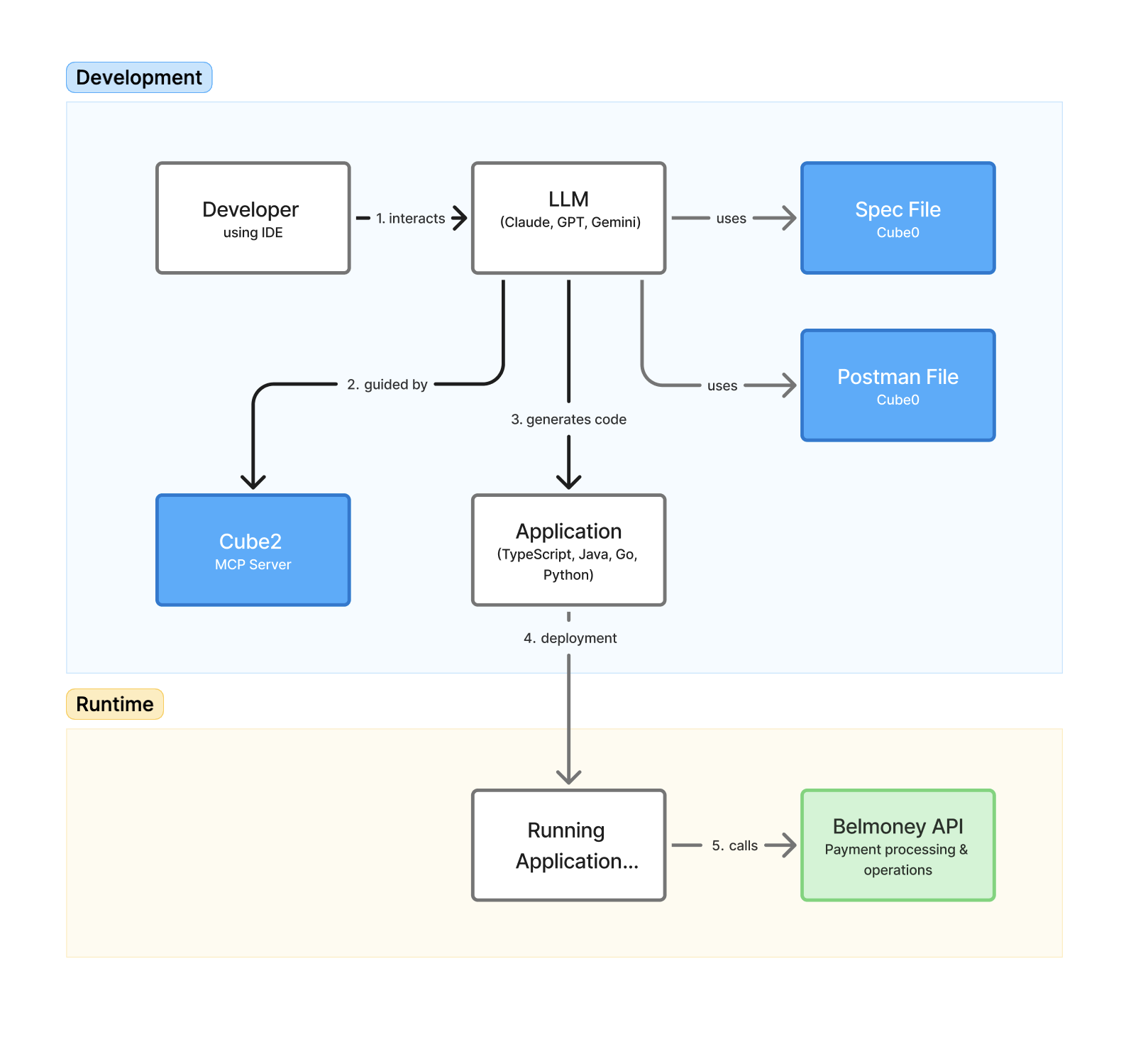
During development, you work in your IDE (Cursor) and talk to the LLM. The LLM:
-
Uses the spec file and Postman collection provided by Cube0 to understand Belmoney’s API and data model.
-
Calls the Cube2 MCP server to resolve mappings, field requirements, and example payloads.
-
Generates application code (TypeScript, Java, Go, Python, etc.) that connects to the Belmoney API.
Once the code is deployed, in runtime your running application calls the Belmoney API directly for payment processing and operations. Cube2 is only needed during development time to speed up and standardize how integrations are built.